![live-furnish-logo_web copy-1.png]](https://resources.imagine.io/hs-fs/hubfs/live-furnish-logo_web%20copy-1.png?height=42&name=live-furnish-logo_web%20copy-1.png)
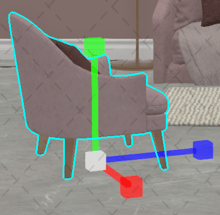
The Scale tool enlarges or reduces the size of the object proportionally.
To access the Scale tool, use R on the keyboard.
Left click on the item you want to scale, and use R to access the sale tool.
Each arm of the tool will enlarge or reduce the overall size of the item.
You can change the hot key in Help - display settings. Click on pencil next to tool to customize the setting.
If you want to move around the scene, spacebar with pan, alt/opt + spacebar +left click will move throughout the scene; left +right , and up+ down.